
How Authors Should Use LinkedIn: A Practical Guide to Readers, Reach and Enquiries


You have enough expertise to fill a book. Yet somehow, sitting down to write a LinkedIn post can still leave you staring at a blank box. What should you say? How much should you give away? And when does talking about your book become talking about it a bit too much?
For a business author, LinkedIn can bring your ideas to people who could use them, recommend them or pay you to help put them into practice. A reader might buy the book. A conference organiser might invite you to speak. Someone who has quietly followed your work for months might finally get in touch about a project.
Those possibilities start with people understanding what you know and why it matters to them. Your book gives you plenty to work with, and you can build a useful presence without making LinkedIn a second career.
Here is how authors should use LinkedIn to bring their expertise, their book and their business together, with practical examples you can adapt to sound like you.
Find the part you need
- Why LinkedIn deserves a place in your author marketing
- How LinkedIn decides who sees your content
- Build an author profile that explains your value
- Connections, followers and subscribers: three different relationships
- What should authors post on LinkedIn?
- Plain text, photographs, carousels or video?
- Turn a newsletter into a reason to return
- Using DMs to open the conversation (without pitch-slapping)
- Where groups and collaboration fit
- Understand the LinkedIn metrics before chasing them
- Which LinkedIn software is worth using?
- What is changing, and what should authors watch?
- Avoid the viral-post trap
Why LinkedIn deserves a place in your author marketing
LinkedIn brings your ideas into a professional context. Someone reading your post may be considering a problem for themselves, their team or an organisation they advise. Your book gives them a substantial way to explore your thinking.
If your book helps people run a business, lead a team or navigate a change in their working life, there is a clear connection with why they might be on LinkedIn. Memoir and other genres can fit too. Think about the community your subject speaks to and where those people spend their time.
LinkedIn reported more than 1.4 billion members and year-on-year growth of over 16% in feed content views in its business update. That is a vast global membership, rather than a count of active UK readers. You only need a small, relevant part of it for your effort to become worthwhile.
Start with an outcome: “Build relationships with learning and development leaders who might commission workshops based on my book.” That is a better organising principle than “post more”.
How LinkedIn decides who sees your content
Your network matters, but your posts can travel beyond it. LinkedIn’s feed engineering explanation describes a system that combines professional profile information with patterns in what members read, react to, comment on and skip.
Its newer ranking systems use AI to understand what a post is about and how someone’s interests develop. So, if your reader keeps exploring delegation, LinkedIn has more information with which to recognise a useful post about it. Being connected helps put you in the picture, although it does not mean every connection will see every post.
LinkedIn’s feed update also describes efforts to reduce repetitive material, engagement bait, automated comments and engagement pods. Its dwell-time research explains why time spent reading or watching matters alongside visible reactions.
What does that mean when you sit down to write? Give LinkedIn, and the person scrolling, a clear idea of what the post is about. Then make it worth their time:
- Write about recognisable problems within your expertise, so a suitable reader can identify the relevance.
- Deliver the idea promised in the opening. A dramatic hook followed by nothing useful wastes the attention you earned.
- Develop a coherent body of work. Explore a subject from different angles rather than repeating the same advice.
- Treat comments as discussion. Answer questions, add detail and challenge assumptions respectfully.
- Use public post visibility when you want discovery beyond your connections, where appropriate to the content.
LinkedIn does not publish a universal formula for an ideal first hour, comment length or external-link penalty. Do not remove a useful link simply because a growth tip says all links belong in comments. Test what helps people take the next step.
Build an author profile that explains your value
Imagine someone has enjoyed one of your posts and clicked on your name. They are interested, but they may know very little about you. Your profile needs to help them join the dots between the idea they liked, the expertise behind it and your book.
To make this practical, we will use a fictional leadership author and their book, Beyond the Bottleneck. You can adapt the examples to your own subject. LinkedIn sometimes moves sections or varies the controls between accounts, but the job your profile needs to do remains much the same.
Banner: make the positioning visible
Your banner is one of the first things a visitor sees, so give it something useful to say. A clear promise, your book cover and a little relevant proof can help someone understand your work before they read a word of the About section.
Example: “Help your team make decisions without waiting for you.” Add the cover and “Leadership adviser | Author | Speaker”, if accurate. Keep important text away from the portrait overlap and outer edges, then check the mobile crop.
LinkedIn recommends 1584 × 396 pixels for a personal profile background. Do not shrink an entire brochure into that space. The image also needs to work for someone who cannot read tiny text on a phone.
Photograph, name and headline: be easy to recognise
Choose a recent photograph in which people can recognise you. The book cover can appear in your banner or Featured section; here, let readers meet the person behind it.
Keep your name accurate and let the headline explain your work. It follows you into comments and other parts of LinkedIn, so it is worth making sense even when someone has not opened your profile.
Compare “Founder | Author | Passionate about people” with:
Leadership adviser helping founders build teams that make decisions | Author of Beyond the Bottleneck | Speaker
The second identifies the audience, problem and book. Use the professional terms your readers recognise, such as leadership development or organisational change, where they accurately describe your work. Avoid a string of unrelated keywords and claims you cannot substantiate.
Contact information and buttons: remove the dead ends
Add a working website and a suitable business contact route. Send book enquiries to a page that explains the book; send speaking enquiries to a page with topics, audience fit and a way to enquire.
Some paid accounts can add a custom profile button, with options such as visiting a website or booking an appointment. Availability depends on subscription and rollout. You can still make your next step clear through Contact info and Featured links.
Check every link as a visitor. A broken booking page can waste the interest generated by an excellent post.
About: connect the reader’s problem with your experience
This is your chance to explain your work in your own words. Start with a situation your reader recognises, then bring in your approach, the experience behind it and the book. By the time you invite them to take a next step, they should understand why it could be useful.
For example:
When every decision comes back to the founder, growth creates more pressure rather than more freedom. I help leadership teams clarify who decides what, so responsibility can move beyond one person.
My book, Beyond the Bottleneck, explores the habits and systems behind that shift. I also work with teams through advisory projects and workshops.
For the book and a practical decision-mapping exercise, visit [your book page]. For speaking enquiries, contact [your business email].
Bring in the experience and evidence that help someone assess your work. If you have spent years helping leadership teams through a particular problem, tell us about that. It gives a reader much more to go on than another unexplained claim to be a thought leader.
Featured: curate a route into your work
The Featured section can showcase your posts, articles, documents and external links. Start with three useful destinations: your book page or sample, a strong explanation of your thinking and a relevant next step.
Think about the person choosing what to open. “Read the first chapter” gives them a clear invitation. A short speaking clip lets an event organiser see how you communicate, while an exercise gives a prospective client a taste of your approach.
General content featuring is distinct from the paid feature that lets eligible subscribers spotlight items from other profile sections. You do not need to buy Premium merely to begin curating your work.
Activity: show what engaging with you feels like
People may scan recent posts and comments before deciding to follow or enquire. Does your activity demonstrate the expertise promised in your headline? Are you answering relevant questions, or mostly promoting yourself?
Your comments help build that impression too. Someone can get a good feel for your judgement from a thoughtful reply, sometimes more quickly than from a polished announcement. Give this section a look whenever you review the rest of your profile.
Experience, Services and Publications: make the book part of the business
Describe your current work in terms of the people you support, the problems you address and the work you deliver. Add relevant media or evidence where the interface allows.
If you list services, make them specific: keynote speaking, leadership workshops or strategic advisory, for example. Do not imply every service is available simply because it relates to your subject.
Add your book under Publications where available, with its correct title, publication details and a useful link. It should also appear higher up the profile: readers should not have to search through your history to discover it.
Skills, education and supporting sections: reinforce the argument
Bring forward the skills, qualifications, projects and experience that support the work you want to do now. You do not need to give every part of your career equal space. Help a prospective reader see how you developed the expertise you are sharing, with accurate details they can understand.
Recommendations: ask for specific evidence
A useful recommendation describes work someone has experienced, what you contributed and why it mattered. Ask a workshop host, client or collaborator who can speak accurately about that experience.
Example request:
Would you be comfortable writing a short recommendation about the workshop we ran together? It would help if you could describe the challenge we addressed and what you found useful. Please use your own words.
LinkedIn lets you request recommendations from connections. A professional recommendation and a review of your book serve different purposes. Ask for the one the person is qualified to give.
Connections, followers and subscribers: three different relationships
A connection is a two-way professional relationship. Following is one-way interest in someone’s public content. A newsletter subscription is a separate decision to receive that publication.
According to LinkedIn’s guidance, first-degree connections can message each other directly. Following lets someone see your public posts and articles without a connection invitation. Following you does not automatically subscribe them to your newsletter.
Neither relationship guarantees a place in the feed. Your network creates relevant starting points; people’s interests and interactions help determine subsequent distribution. A thoughtful comment can also introduce your perspective to people reading somebody else’s post.
Build around readers, buyers, collaborators and people who influence opportunities. For a leadership author, that could include HR directors, founders, conference organisers and relevant professional communities, not only other authors.
Connect with people you know and trust, including those you have met through genuine professional interaction. Follow unfamiliar people whose work interests you and contribute meaningfully before trying to deepen the relationship. Buying followers or collecting irrelevant connections gives you a bigger number without a stronger audience.
What should authors post on LinkedIn?
The good news is that you already have a substantial source of material: the book. Go back to a chapter and look at the questions it answers, the assumptions it challenges and the examples that make the point clear. Each could give you something useful to discuss without simply posting an extract and hoping for the best.
| Content purpose | Illustrative author post |
|---|---|
| Explain a problem | “Your team may not need more confidence. They may need clearer permission to decide.” Explain the distinction. |
| Demonstrate a method | Show a three-question decision checklist from your framework. |
| Explore experience | Describe a decision you got wrong, what changed your understanding and what you do differently. |
| Establish evidence | Share an accurately scoped finding or a client example you have permission to discuss. |
| Invite application | “Which decision still comes back to you every week?” Explain how to investigate it. |
| Sell directly | Explain who the book is for, what it helps them understand and where to buy it. |
Before publication, share emerging questions and useful thinking, without presenting untested ideas as established findings. At launch, coordinate cover reveals, extracts, events and accurate purchase information. Afterwards, use reader questions and current situations to revisit the substance.
Announcements belong in the mix. They become more interesting when you explain what the milestone makes possible for the reader.
For a manageable starting rhythm, try two substantive posts a week and three short sessions for relevant comments and replies. Batch the preparation, then be present for the conversation. This is our suggested starting plan, which you can adapt around your audience and capacity.
Personal or professional: which gets more impressions?
There is no dependable rule that personal posts always win. A personal story can prompt recognition and conversation; a detailed professional explanation can attract fewer people who are much closer to buying.
Connect experience with a useful insight without forcing a business lesson onto everything. “I stopped answering work messages during dinner” could lead to an honest discussion about founder dependency. A photograph with your children does not need to become a leadership metaphor.
Choose boundaries before publishing. You can sound human without exposing private relationships, discussing a client without permission or manufacturing a vulnerable moment.
Plain text, photographs, carousels or video?
A useful idea can work in several formats. The question is what helps the reader understand it, and what gives them a feel for you. You do not need to turn everything into a carousel just because the last one did well.
Metricool’s LinkedIn study analysed 673,658 posts from 63,108 accounts worldwide across January to February comparison periods in 2025 and 2026. It reported 63% higher average engagement rates for personal profiles than Company Pages. Carousels and multi-image posts performed strongly; video did not lead the personal-profile comparison.
These are observations from a provider’s account sample, rather than a controlled experiment or a UK-author benchmark. Use them to choose tests, then review your own results.
| Format | Use it when | Make it work |
|---|---|---|
| Plain text | The argument or story is the attraction. | Open with a concrete situation and develop one idea. |
| Photograph | The person, setting or event adds meaning. | Explain what we are seeing and why it matters. |
| Graphic or diagram | A relationship is easier to see than describe. | Make labels legible on a phone; add useful alternative text. |
| PDF document carousel | An idea benefits from a short sequence. | Try a problem, explanation, example and practical action. Keep each page readable. |
| Native video | Your explanation, delivery or demonstration matters. | Give the viewer a reason to watch immediately; caption and check the audio. |
| Poll | You have a useful question for an existing audience. | Discuss the result and its limits; voters are not a representative market sample. |
For video, try a focused 45 to 90-second explanation, a practical demonstration or a short extract from a talk. That is a manageable WBR starting point, not LinkedIn’s required length. A speaker can use video to let prospective bookers experience their delivery.
A carousel might teach an exercise from the book; a photograph might show it being used in a workshop. Neither needs a cover mock-up pasted into every image. Recognisable branding helps, but the content must still deserve attention.
Turn a newsletter into a reason to return
A post introduces an idea. An article gives it room. A newsletter gives readers a recurring publication they can choose to receive.
LinkedIn’s newsletter FAQ distinguishes following from subscribing and describes email, in-app and push notifications. Notification availability and reader settings matter: publishing is not a promise that every subscriber opens an email.
For an author, the opportunity is continuity. Someone who is not ready to buy a book or commission work can still get to know your thinking.
Choose a promise you can keep
“Monthly updates from Jane” says little about the benefit. An illustrative title such as “Decisions Beyond the Founder” gives a leadership reader a clearer reason to subscribe.
Describe the recurring value: “Practical ways to help your team take responsibility without losing direction.” The book supports that promise; the newsletter should remain useful between launches.
Fortnightly is a useful starting point if you can give each edition proper attention; monthly may fit your working life better. Before committing to weekly, think about the preparation and the conversations afterwards. You want subscribers to recognise something worth opening when it arrives.
How to create a LinkedIn newsletter
On desktop, open Write article, choose whether to publish as yourself or an eligible Page, then use Manage → Create newsletter. Add its title, description, publishing frequency and identifying image.
Write the first edition, check the publishing identity and preview it before publishing. LinkedIn’s management instructions explain that the first published edition creates a newsletter page and, by default, prompts connections and followers to subscribe. Page access has separate requirements.
Do not look for an old Creator Mode toggle: LinkedIn removed it.

What should an edition contain?
Try 600 to 1,000 words as an editorial starting point, expanding only when the subject earns it. Build around one useful question:
- A recognisable situation and a clear promise.
- An explanation, example or framework.
- A way to apply it.
- A relevant next step.
Use a consistent masthead or cover treatment, a distinct edition title and mobile-readable images. A banner should help recognition without pushing the useful material far down the page. The article editor supports covers, images, links and formatting.
Bring in the book where it adds substance: “Chapter four explores this distinction; here is one exercise you can try.” Offer a sample after demonstrating its relevance. Later, invite readers who need implementation support to explore a workshop or advisory service.
A useful CTA belongs beside the need it answers. You might link to an exercise after explaining it, then close with a discussion question. Avoid stacking a purchase link, calendar link and three downloads into every section.
From subscribers to enquiries
Invite people to subscribe from relevant posts, your profile, website and events. Explain what they will receive. Do not send a mass DM simply because someone joined.
LinkedIn’s analytics show subscriber growth and audience characteristics. Review whether the people arriving match your intended readers, then track relevant replies and enquiries separately.
A LinkedIn subscription is not an opt-in to your own mailing list. Offer a separate, clearly explained sign-up if someone wants resources by email. Do not plan on an exportable subscriber-email list: LinkedIn documents profile-based subscriber information, not a newsletter email-export facility.
Using DMs to open the conversation (without pitch-slapping)
You do not have to wait for somebody to ask about your book before speaking to them. Outreach belongs in your author marketing too. The awkwardness usually starts when a small sign of interest gets treated as permission for a full sales pitch.
Think about the person opening your message between meetings. Can they immediately see why you are contacting them? Is there something specific to respond to? A genuine reason, a little context and one easy question will usually give you a better conversation than a paragraph about everything you offer.
Start with people already engaging with your ideas
People commenting on your posts are an obvious place to begin, especially when they describe a situation your book addresses. Answer publicly first so the discussion is useful to everyone. Move into a DM when there is a reason for a more individual exchange.
Suppose someone comments that their managers keep escalating decisions. If you are already connected, an opening could be:
“Hi Priya, your comment about decisions always coming back to the founder stayed with me. You mentioned this was happening in your team. Where does it tend to get stuck: knowing who can decide, or feeling confident enough to do it?”
That is a question they can answer from experience. You have read what they said and followed the thread, rather than used their comment as an excuse to unload your offer.
A reaction is a lighter signal. Someone might have liked the sentiment, the photograph or a point made by another commenter. Look for a pattern of relevant interest before reaching out, and keep the message proportionate:
“Hi David, we’ve crossed paths on a few of the posts about delegation. I’m curious which part connects most with your work: developing managers, or helping founders step back?”
Use that only when you really have crossed paths. Avoid announcing that you are monitoring everything they click. If they are not a connection and ordinary messaging is unavailable, continue the public conversation or use an appropriate introduction; do not try to work around the account’s limits.
Reach out to people who fit your ideal reader or client
Your ideal client profile gives you somewhere sensible to look. It does not tell you that every person with the right job title needs your help.
Read their public work and look for a concrete connection: an event they are organising, an initiative they have discussed or a question they are exploring. Where a legitimate messaging route is available, you might say:
“Hi Aisha, I saw your post about giving newly promoted managers more support. I write about the shift from being the person with the answers to helping other people find them. What are you finding hardest for that group at the moment?”
You are opening a professional exchange around something they chose to discuss. Do not invent a problem from their job title, send a faux research question that leads straight into a pitch, or imply you know more about their organisation than you do.
If you cannot find a convincing reason to write, spend a little longer listening. Following their work may be the right first step.
Ask your existing network for thoughtful introductions
Your network may already include someone who knows the people you would like to meet. Make the introduction easy to assess, with a clear reason and no expectation that your contact will spend their goodwill for you.
“Hi Jo, I noticed you know Sam at Northbridge. I’m exploring a roundtable on decision-making in growing teams, and his work on manager development looks relevant. Would you feel comfortable asking whether he’d welcome an introduction? Absolutely fine if it isn’t a fit.”
Once Jo has checked and made the introduction:
“Hi Sam, thanks for being open to the introduction, and thank you, Jo. I’m bringing together a small group to discuss where decision-making gets stuck as teams grow. Would that be relevant to the work you’re doing?”
The names, company and roundtable here are illustrative. The principle is to give both people a clear choice, rather than ask a mutual connection to pass on an unexpected sales message.
Bring in the book when it helps the conversation
When someone describes a problem your book tackles, you have a natural way to introduce it:
“That’s a useful distinction. I explore it in chapter four, including a decision-mapping exercise. Would you like me to send the sample so you can see whether it would help?”
If they ask, send what you promised. Let them read it before adding a calendar link, a proposal and three more resources. When they ask about working with you, explain the relevant service and what you would need to know to assess the fit.
A single, considerate follow-up can be appropriate when there was a genuine reason to talk. “Just checking whether this is relevant to your manager programme; happy to leave it here if the timing isn’t right” is enough. Silence is a reason to leave space, rather than increase the pressure.
These examples show tone and context, not permission to send marketing to everybody who reacts. The ICO confirms that social DMs can count as electronic mail and direct marketing rules can apply. A like, follow or connection is not blanket consent to promotional messages.
Where groups and collaboration fit
There is plenty of value in getting to know other authors, but remember to spend time where your readers are too. If you write about organisational change, a lively leadership group could introduce you to questions and conversations that never arise in a book-promotion group.
Check recent discussions, moderation and whether relevant people actually participate. Answer questions properly before sharing a link, and respect group rules. If a group is inactive or dominated by promotion, it need not occupy your weekly schedule.
For collaborations, seek a genuine overlap in audience and expertise: a joint interview, an event discussion or a guest contribution. Explain the useful question you would explore together. A large follower count alone does not make someone the right partner.
Understand the LinkedIn metrics before chasing them
Different dashboards define engagement differently. LinkedIn’s combined post analytics include reactions, comments, reposts, saves and sends. A third-party engagement rate may also include clicks or use a different denominator.
| Metric | What it means | What to ask |
|---|---|---|
| Impressions | Times the post was displayed; repeat displays can count. | Is visibility growing among relevant people? |
| Members reached | Estimated distinct members and Pages reached. | How many different accounts saw it? |
| In-network / out-of-network | Share of impressions inside or beyond your followers and connections. | Are you reaching new audiences? |
| Reactions | Responses such as Like or Insightful. | What attracted acknowledgement? |
| Comments | Recorded comments, not unique potential buyers. | Are people discussing a relevant problem? |
| Reposts, saves and sends | Sharing to feeds, keeping a post, or sending it within LinkedIn. | Is the idea useful enough to revisit or pass on? |
| Profile activity | Reported actions associated with the post, where available. | Does interest continue beyond reading? |
| Link engagement | Recorded link activity, subject to the dashboard’s exclusions. | Does your website confirm relevant visits? |
| Video views and watch time | Views and time spent watching, not the same as impressions. | Do people stay for the explanation? |
| Newsletter article views | Views of an edition, distinct from seeing its promotional post. | Which subjects earn deeper attention? |
LinkedIn’s post guidance notes that analytics are estimates and your own activity can count. Its video guidance defines a video view as more than two seconds of watching. That is not evidence somebody watched the whole explanation.
For an illustrative engagement rate, 80 interactions divided by 2,000 impressions gives 4%. State which interactions you counted before comparing that number with another report.
Where to find your analytics, and what to do next
On desktop, open Me → Posts & Activity, choose the relevant post and click its impressions figure or View analytics. On mobile, open your profile, go to Activity → Show all posts and open the analytics beneath the post. LinkedIn’s navigation guide explains both routes.
For the broader picture, open the Analytics area of your profile, or your post-impressions figure, and look for combined content analytics. Start with a comparable period, such as the past 28 days, so you can see patterns across several posts. Menu labels and available breakdowns can differ as features roll out.
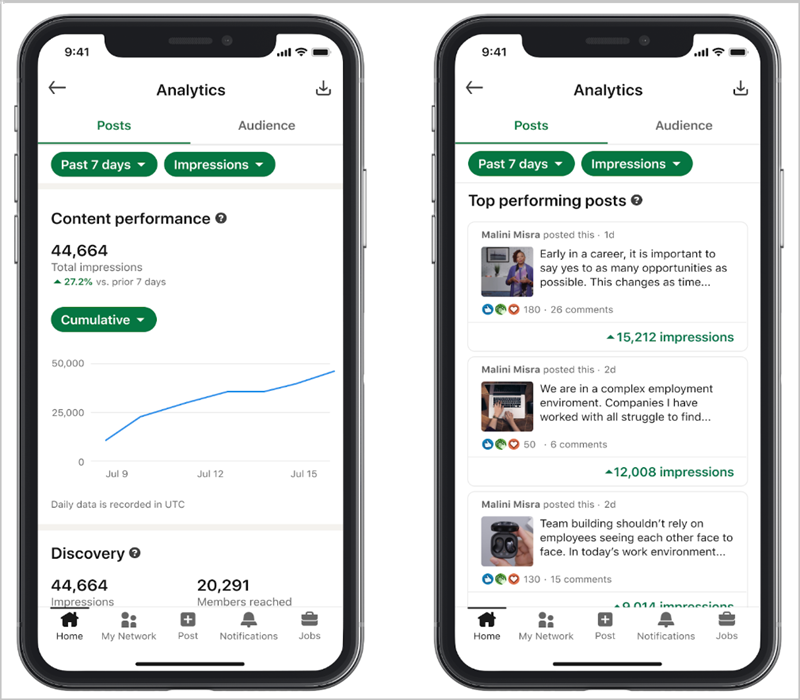
The interesting part begins after you notice that one post did well. Open it and ask what the reader was responding to. Was it a familiar problem, a useful exercise, a story or simply a photograph people enjoyed? Then look at who engaged and what happened afterwards.
| What you notice | What it could mean | A useful next move |
|---|---|---|
| A post reaches plenty of people outside your network. | The topic is travelling beyond your existing audience. | Check the audience breakdown and new followers before deciding to make more of it. |
| A practical exercise attracts saves and relevant questions. | People may want to use the idea, or need help applying it. | Make a follow-up example, newsletter edition or short demonstration. |
| A personal post gets far more views than your usual work. | The story resonated, though the audience may be broad. | Look for relevant profile visits and conversations; keep the themes that connect with your work. |
| A post attracts profile activity but few enquiries. | People are curious, but may need clearer information or a next step. | Review your headline, Featured links and enquiry page from their perspective. |
| A newsletter attracts the right job roles but few responses. | People may be reading quietly, or the invitation to respond may be too vague. | Ask a focused question and offer one relevant way to continue. |
These are possibilities to investigate, rather than diagnoses from a single number. The point is to choose your next experiment with a little more understanding.
Keep a simple monthly note of the subjects, formats and invitations that brought relevant conversations. Add tagged website links where useful and ask enquirers what prompted them to contact you. A post with a small audience can be commercially valuable; a huge spike needs a closer look before you decide it is the thing to repeat.
SSI: what is it actually for, and should authors care?
SSI stands for Social Selling Index. LinkedIn created it to measure activity associated with building professional relationships and developing business through the platform. Its four-part framework covers your professional brand, finding relevant people, engaging with insights and building relationships. Each contributes up to 25 points, giving a total out of 100.
That is why it appears so often in sales advice. It turns a fairly broad activity, “use LinkedIn to build business”, into a visible score that a salesperson or team can track. LinkedIn also includes it in its Sales Navigator training and usage reporting. It is designed around social selling activity, rather than evaluating the quality of your book.
For an author who also consults, coaches or speaks, it can be a useful nudge. If you post regularly but never meet anyone new, the finding-people and relationship sections might prompt you to be more deliberate about your network. If people visit your profile but still seem unclear about what you do, reviewing the professional-brand area could be worthwhile.
You can check the SSI dashboard while signed in, if it is available to your account. Look for a neglected area, choose an action that serves your actual goal, then get on with the work. You might improve your profile, reconnect with a previous event host or make time for a relevant discussion.
You do not need to worry about SSI to be a successful author on LinkedIn. There is no published SSI threshold that guarantees reach, enquiries or book sales, and you should not buy a subscription simply to improve the score. If your content reaches suitable readers and your conversations lead somewhere useful, those results deserve more attention than whether your SSI went up three points this week.
Which LinkedIn software is worth using?
There is a tool for almost every part of this process, which is handy until managing the tools becomes another job. Start with what is taking too much time or falling through the cracks. You may already own something that solves it.
The useful distinction is between preparing content, publishing it, understanding the results and keeping track of relationships. A product can be good at one and limited at another.
| Tool | Where it can help an author | What to consider |
|---|---|---|
| LinkedIn’s own tools | Native scheduling, articles, newsletters and first-party analytics. | A sensible starting point for a solo author. Planning across several channels takes more work. |
| Buffer | Drafting and scheduling LinkedIn content alongside other social channels. | Check personal-profile support, tagging and analytics for the formats you use. |
| Metricool | A shared content calendar and cross-channel reporting. | Its personal-profile metrics cover posts published through Metricool; do not assume a complete archive of everything you published elsewhere. |
| Taplio | LinkedIn-focused ideas, drafting, scheduling and analytics. | Also markets automated outreach and engagement. Assess those separately from its writing tools against LinkedIn’s rules. |
| Semrush Social | Planning and publishing across channels, including LinkedIn profiles and Pages. | The Social Toolkit is a different job from website SEO research; check what your subscription includes. |
| HubSpot | LinkedIn publishing and reporting within a wider marketing and CRM workflow. | Its social tools require Marketing Hub Professional or Enterprise. The free CRM alone does not include this capability. |
| HighLevel Social Planner | Drafting and scheduling within the same platform as your contact and follow-up records. | Features vary by network and account. Check the LinkedIn formats and reporting you actually need. |
| Sales Navigator | Researching relevant people and organisations, with saved searches and alerts. | Most useful when you have a clear outreach plan and time to develop relationships. |
| Surfer | Developing and optimising website content that could later feed your LinkedIn ideas. | Its focus is search visibility. We would not buy it solely to improve LinkedIn posts or treat a website content score as a LinkedIn ranking score. |
| ChatGPT and Claude | Organising your material, developing angles, drafting, reviewing and researching with the appropriate tools enabled. | Give them your actual thinking and check the output. Availability, research tools and data settings depend on your account. |
Taplio: useful features, with a boundary worth understanding
Taplio brings several LinkedIn tasks together, which may appeal if you want a dedicated workspace for posts. Its own documentation also describes automatic connection requests, replies and DMs triggered by post engagement.
We would keep those functions separate when evaluating it. A scheduler helping you publish approved content is doing a different job from software contacting people or manufacturing interaction on your behalf. Taplio’s assurances about human pacing do not override LinkedIn’s prohibited-software rules. We would not recommend switching on automated outreach or engagement on the strength of the vendor’s reassurance.
Check your CRM before buying another scheduler
If your business already uses HubSpot, HighLevel or another CRM with social publishing, investigate that first. Keeping approved posts and follow-up tasks in a familiar system may be more useful than adding another dashboard.
The CRM also gives you somewhere to remember what happened after a LinkedIn conversation. Record that an event organiser asked for speaking topics, which resource you sent and when you agreed to follow up. That can do far more for your business than collecting thousands of names with no context. CRM ownership does not grant permission to scrape LinkedIn or enrol contacts in unsolicited campaigns.
Give ChatGPT or Claude something worth working with
Your manuscript, reader profile, workshop notes and previous writing are much better starting material than “write me a viral LinkedIn post”. Use a suitably configured account and material you are entitled to share, then ask for a specific piece of help.
For example:
“Here is a passage from my book and a description of my ideal reader. Suggest five LinkedIn angles based on problems they would recognise. Explain the point of each, and ask me for any missing examples. Do not invent experiences or results.”
Or:
“Turn these voice notes into a first draft. Keep my argument, the detail and the way I speak. Remove repetition, but flag anything that needs clarification rather than filling it in.”
For research:
“Find current primary sources about this claim. Give me the original links, the evidence’s scope and any limitations. Then suggest questions I could explore from my own experience.”
Both products offer ways to work with supplied context; their research capabilities depend on the available tools and settings. ChatGPT projects can keep related files and instructions together, while Claude’s research guidance explains its multi-source research workflow. Open the sources yourself before relying on a claim.
This is where your voice matters. If a draft could have been written by any of your peers, it probably needs more of your experience, your examples or your point of view. Polishing it further will not solve that.
Automation, AI and bots: where is the boundary?
Supported publishing integrations differ from tools that impersonate activity in the LinkedIn website. Check what a product actually does, not whether its marketing calls it “safe”.
LinkedIn’s prohibited-software policy restricts scraping, unauthorised automated activity and fake engagement. Automated connection sequences, comment bots and engagement pods can put your account at risk. Slow automation is still automation; a vendor’s daily limit is not LinkedIn approval.
AI assistance is a separate question. LinkedIn’s AI guidance permits support such as refining language while expecting your own perspective and responsibility. It recommends transparency where heavy AI involvement would not be obvious.
Use assistance to organise notes, improve clarity or prepare captions. Supply your actual argument and examples, check accuracy and approve what appears under your name. Outsourcing your point of view undermines the reason readers might want your book.
What is changing, and what should authors watch?
LinkedIn will keep moving things around, and there will always be somebody announcing that everything you knew about posting has changed. The direction it has actually described is more useful to watch: stronger matching to people’s interests, less artificial engagement and more ways to understand your audience. LinkedIn’s analytics guidance describes a newer desktop table for recent post performance, with gradual access and mobile support to follow.
If a new control has not appeared in your account yet, check the rollout details before assuming you have missed something. Be equally cautious about confident predictions of the next algorithm. You can keep developing useful ideas and good relationships while LinkedIn gets on with changing the buttons.
Avoid the viral-post trap
Elon Musk thinks LinkedIn is cringe. You may have had days when you agree with him. The breathless announcements, suspiciously tidy life lessons and stories that somehow turn every school run into a masterclass in leadership can be a bit much.
His comments reported by NDTV also talked up an X competitor. There is a commercial backdrop to the criticism, but you can recognise the behaviour he is mocking without letting it put you off a platform your readers use.
You do not have to perform success all day to be interesting. Tell us what you have noticed. Explain something we keep getting wrong. Share an experience that changed your mind, including the awkward detail that a generic motivational post would smooth away. That is often where the useful material is.
Going viral can be enjoyable, and occasionally valuable. Before you build your whole plan around repeating it, look at who arrived and what happened next. Did suitable readers subscribe? Did an organiser ask about your speaking? Did someone raise a problem your work can help with?
Those are promising signs. A large audience laughing at an anecdote unrelated to your work may give you a lovely afternoon of notifications, but it does not necessarily give your book somewhere useful to go.
Your book already contains a substantial body of thinking. Start there, make it relevant to the people you want to reach and leave room for a proper conversation. You can build a strong author presence without becoming the person whose posts you would quietly mute.
Related posts
How to Find a Publisher for Your Nonfiction Book UPDATED EDITION: Agents, Proposals and What to Send

How to Smash a Physical Book Launch: 10 Essential Tips for Success

How to Write a Leadership Book That Builds Your Authority

Book Reviews: Why They Matter and How to Get Them for Your Book

How to Sell More Books on Amazon: A Practical Guide for UK Business Authors

Author marketing: how to connect your book, your audience and your business